Developed & produced in Switzerland

EMU M-Center: M-Bus and Modbus data logger

M-Bus master, data logger and gateway in one device. The M-Center reads meters from any manufacturer and supplies energy management, building automation, billing and the cloud at the same time – with no intermediate computer and no local PC software.

The most widely used EMU data logger and gateway – compatible with many billing service providers.

powered by swiss made software
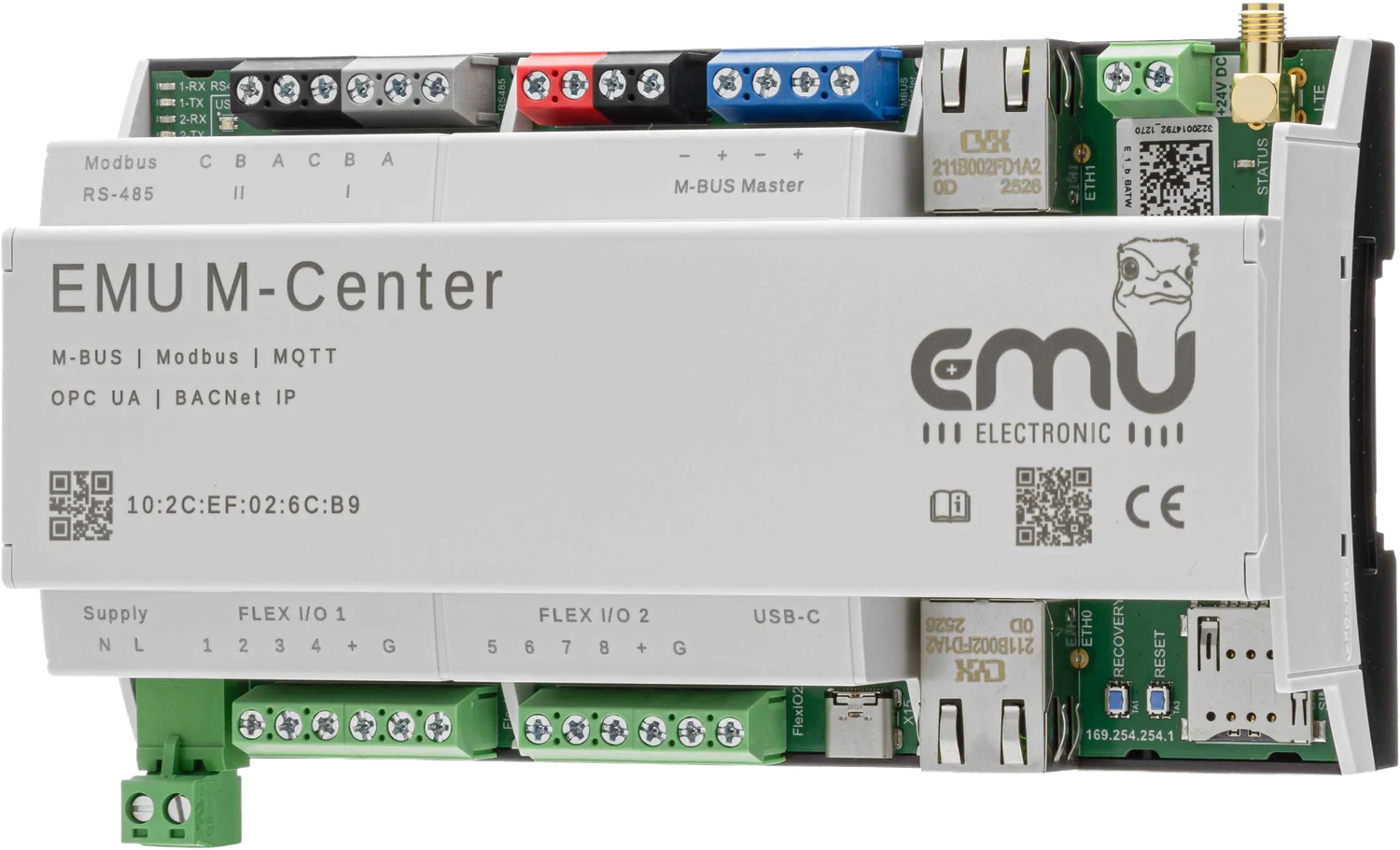
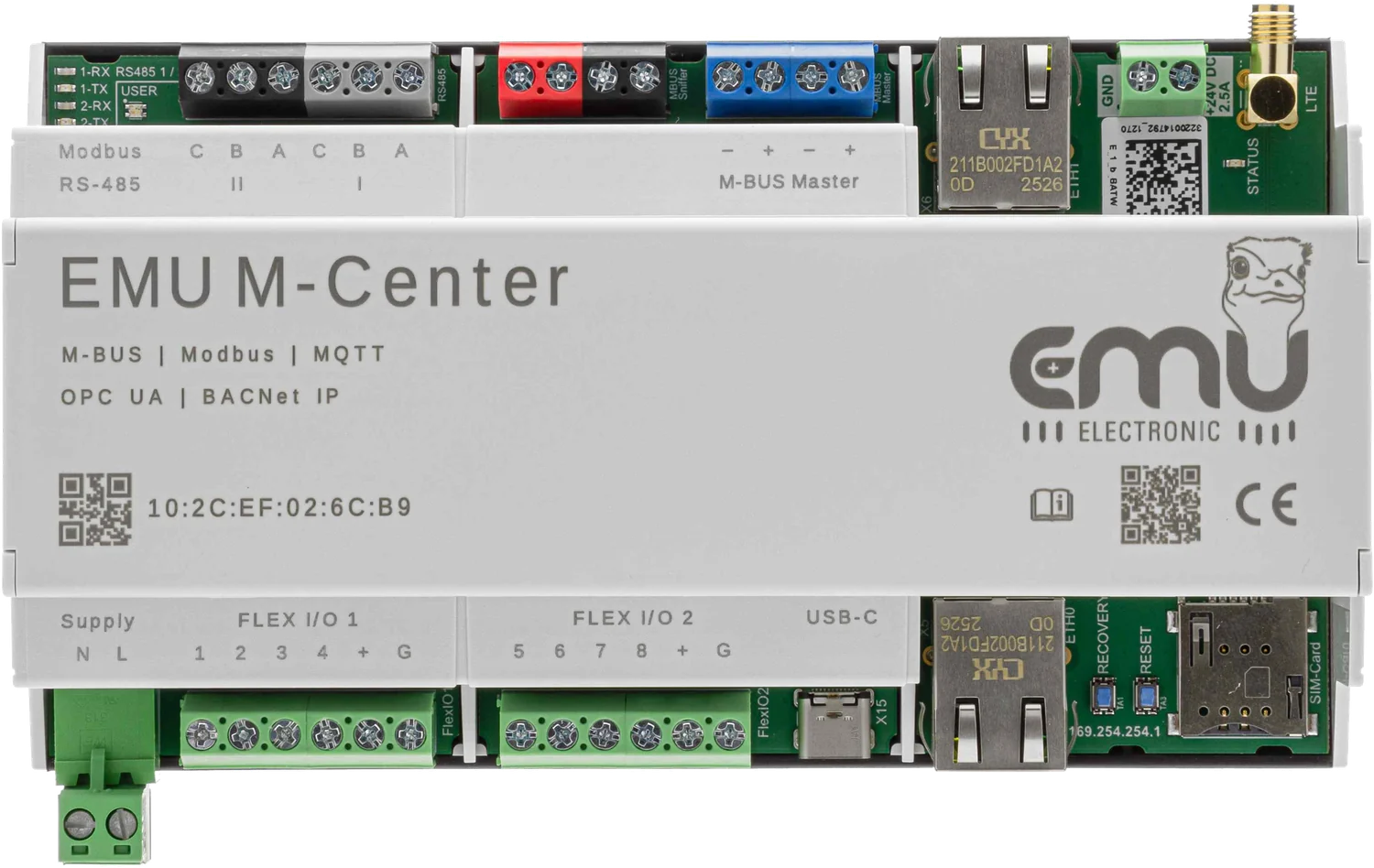
Front view of the EMU M-Center: at the top Modbus RS-485 terminals I and II, M-Bus sniffer, M-BUS master, Ethernet ETH1, 24 V supply and LTE antenna; at the bottom supply N/L, two Flex I/O blocks, USB-C, Ethernet ETH0, recovery, reset and SIM card slot
EMU M-Center · 162 mm · 35 mm DIN rail · approx. 400 g

Show technical details, limits and part numbers.

Area of use

What is the EMU M-Center made for?


Wherever meters of different generations and manufacturers have to work together with modern data systems: industrial plant, production operations, apartment buildings and infrastructure projects.

Connect everything

M-Bus, RS-485 and Modbus. Existing meters from any manufacturer can be integrated into existing control systems just as easily as into the cloud.


Automatic meter discovery by primary and secondary address, manual additions possible. Device drivers through Device Management.

Share everything

MQTT, BACnet IP, Modbus TCP, API, (s)FTP, CSV, JSON, Excel and email – at the same time, not one after another.


MQTT with configurable topics and QoS, TLS encrypted. BACnet IP B-ASC certified, incl. BBMD. OPC UA available. MQTT, BACnet IP, OPC UA and the M-Bus to Modbus TCP conversion require a licence.

Less complexity

One device for all meters and all applications. That shortens commissioning and validation, and the operator takes over an installation from the installer that they can actually follow.


HTML5 web server, multilingual, configurable locally and remotely. Over 400 web-based accesses. Firmware update and backup through Joulio-Web Device Management.

The real problem

What problem does an M-Bus data logger solve?


Fitting meters is rarely the problem. It gets difficult afterwards: the water meter from 2009 speaks M-Bus, the new charging infrastructure Modbus TCP, the heat pump delivers S0 pulses, and the building management system wants BACnet. Each of these systems is manageable on its own. Together they form a setup in which nobody can tell any more whether all values are complete.

That is exactly where the M-Center sits. It does not only translate between protocols; it takes on the role nobody else has: the authority that knows which meters exist, when each last answered and where a gap has appeared.

At the same time, not one after another

The second point is multiple use. When a control system polls a Modbus segment, it effectively blocks it for everyone else. The M-Center reads once and serves several target systems in parallel – building management over BACnet IP or OPC UA, cloud and dashboards over MQTT, billing via CSV, Excel or JSON by (s)FTP and email. A new target system means one configuration, not a second set of wiring.

Handover without loss of knowledge

The third point is unspectacular but decides how operation goes: everything runs in a web browser, with no local PC software. What the installer set up is exactly what the operator sees – there is no computer in the cabinet holding the only copy of the configuration.

Protocol background

How the individual interfaces work and what counts when sizing them is set out in detail on the Professional II interface pages – the protocols are the same.

M-BusBus load, addressing, cable length RS-485 / Modbus RTUTopology, termination, registers TCP/IPModbus TCP versus MQTT

What projects founder on

Almost never the radio link or the bus layout, almost always the fact that a reading quietly fails for months and only shows up in the annual billing. That is why error flags, communication faults and outliers are monitored and logged around the clock.

From measuring point to application

Which meters does the M-Center read and where does it pass them on to?


Inputs

What gets connected

  • Electricity, water, heat over M-Bus – up to 250 devices
  • Meters and sensors over Modbus RTU – up to 64 devices
  • Meters and controllers over Modbus TCP – up to 60 devices
  • S0 pulses – up to 8 through Flex I/O

Nominal voltage, M-Bus master40 V DC
Baud rates300 / 2400 / 9600 Bd – 2400 Bd recommended
Maximum slaves250
Current draw per slave1.5 mA (unit load)
Load at 230 V AC450 mA continuous · 600 mA peak
Load at 24 V DC1.6 A
Maximum cable length5000 m at 100 nF/km, max. 90 Ω
Recommended cableJ-Y(ST)Y 2×2×0.8 mm, screened where possible
TopologiesStar, tree, line
ProtectionShort-circuit and overcurrent monitoring, galvanically isolated
Polaritypolarity-independent, either way round
StandardEN 13757-2 and EN 13757-3
M-Bus master in detail

Rule of thumb for sizing: slaves × 1.5 mA has to stay below the continuous rating of the chosen supply. 250 unit loads therefore have to be calculated at 24 V DC, not at 230 V AC.

Outputs

Where the data goes

  • Building and energy management – BACnet IP, OPC UA
  • Billing – CSV, Excel, JSON, (s)FTP, email
  • Cloud and dashboards – MQTT, API
  • Control systems – Modbus TCP

MQTTconfigurable topics and QoS, TLS encryption · licence
BACnet IPB-ASC certified, BBMD function · licence
OPC UAavailable · licence
Modbus TCPoutput and M-Bus to Modbus TCP conversion · licence
Data formatsCSV, JSON, Excel
File transfer(s)FTP, SMTP (email)
Remote readingthrough a web browser
Time synchronisationNTP, errors in the message log
System connection

Data quality

How does the M-Center make sure the measured data is complete?


Every connected meter and sensor is read automatically and cyclically. Failed readings are detected and logged, while error flags, communication faults and outliers are monitored around the clock. Live and historical data are available at any time.

16 GB of integrated data storage. The time base is synchronised by NTP; synchronisation errors appear in the message log, so that gaps in the load profile can still be traced to a cause.

Commissioning

  • Operated in a web browser, with no local PC software
  • Encrypted connection to Joulio-Web
  • Automatic meter discovery
  • Plug-and-play drivers
  • VPN

Step by step: commissioning the M-Center →
Service port, M-Bus, Modbus, MQTT and Joulio-Web – with animations.

Communication

How does the M-Center capture measuring devices and where does it pass the data on to?


The meters come in on the left, the values go out on the right, and at commissioning the laptop hangs off the bottom. All paths run at the same time – the M-Center does not have to decide on one target system.

EMU M-Center Reads, stores, translates, passes on M-Bus EMU Professional II M-Bus, heat and water meters RS-485 Modbus RTU, two segments with up to 32 devices each Modbus TCP Meters and controllers on the network Control system Modbus TCP, BACnet IP and OPC UA over LAN Joulio-Web and cloud MQTT over TLS, (s)FTP, API, email Mobile network LTE over SIM card, where no network is in place Service port to the laptop 169.254.254.1, browser, no setup
  • M-Bus. The integrated level converter feeds up to 250 devices: EMU Professional II M-Bus, heat, water and gas meters, including from other manufacturers. Two wires, polarity-independent.
  • RS-485 / Modbus RTU. Two separate segments with up to 32 devices each, 1200 m maximum, termination resistor at the far end. For meters and controllers that speak Modbus RTU.
  • Modbus TCP on the input side. Devices already on the network are read by the M-Center directly over Modbus TCP – with no second set of wiring.
  • LAN to the target system. Through the network connection the M-Center serves several systems at the same time: Modbus TCP and BACnet IP for the control system, OPC UA for automation, MQTT over TLS for Joulio-Web and dashboards, plus (s)FTP, API and email.
  • LTE over SIM card. Where no network is available on site, the built-in LTE modem takes over. The connection is set up by the device towards the outside; no port forwarding is needed.
  • Service port for commissioning. The second Ethernet port has the fixed address 169.254.254.1. Plug in the laptop, open the browser, configure – regardless of whether a DHCP server is running in the building.

Each path is additionally marked by its dash pattern, so that the assignment does not depend on colour alone. The diagram shows the principle, not the terminal assignment – that is in the manual.

Firmware

How does a firmware update work on the EMU M-Center?


Three routes, depending on how the installation is connected. None of them requires software on a particular computer.

Online through the web interface

If the M-Center has an internet connection, it fetches the firmware itself. It is triggered in the browser; the device downloads and installs. For distributed installations that is the normal case.

Offline through the web interface

Without internet access the firmware file is downloaded in advance and uploaded in the browser. For that the device only needs a connection to the laptop – including over the service port.

By USB stick

The third option is the USB-C connection on the underside. That route is independent of the network and also serves for recovery if the device no longer starts.

Before the update

Back up the configuration. Device Management in Joulio-Web creates the backup and restores it onto a replacement device. For the online route the update servers have to be allowed in the firewall; which these are is stated in the frequently asked questions.

Hardware

Which connections does the EMU M-Center have?


All terminals are labelled and accessible from the front. The bus connections are at the top; supply, Flex I/O and the service port at the bottom. That keeps the wiring traceable years later too.

EMU M-Center at an angle on the DIN rail, both terminal rows and the front panel labelling visible
Overall view. 162 mm wide, for the 35 mm DIN rail, around 400 g. The front panel shows the MAC address and the supported protocols.
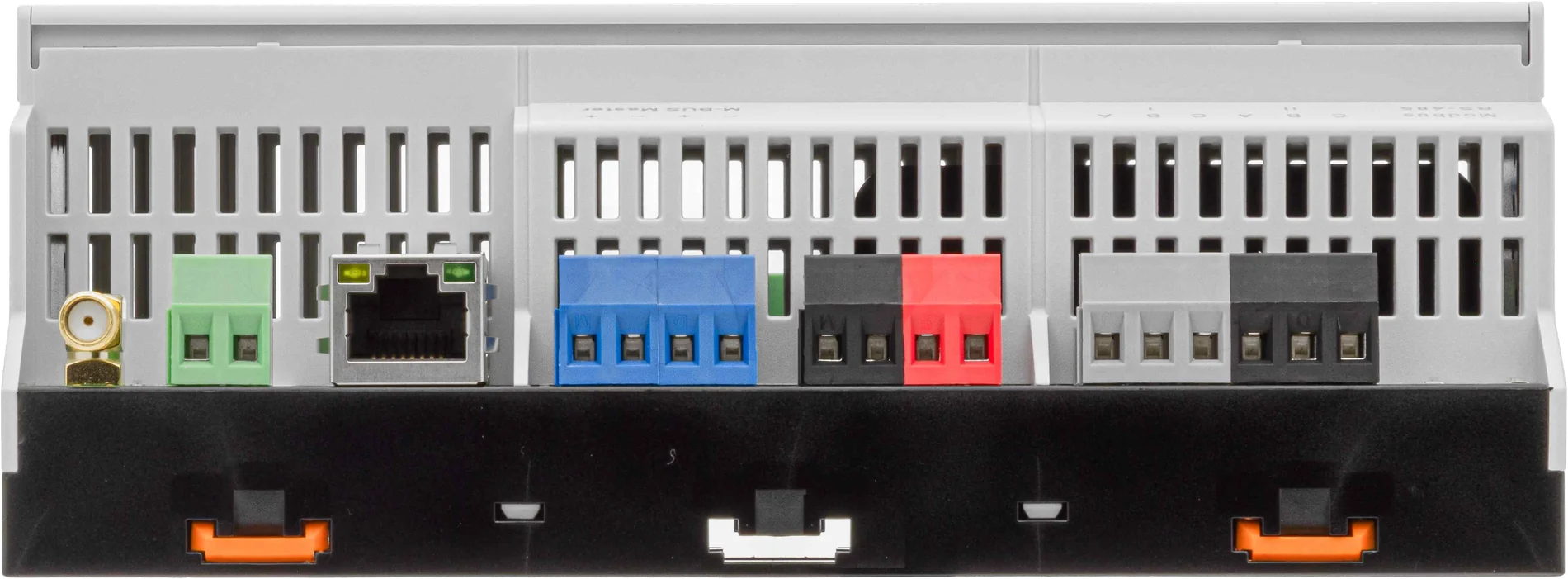
Upper terminal row of the EMU M-Center with Modbus RS-485 terminals, M-Bus sniffer, M-BUS master, Ethernet, 24 volt supply and SMA antenna connector
Top: the bus side. Modbus RS-485 I and II with A, B and C each · M-Bus sniffer · M-BUS master with two terminal pairs − and + · Ethernet ETH1 · supply +24 V DC and GND · SMA connector for the LTE antenna · status LED and LEDs for RX and TX of both RS-485 segments.
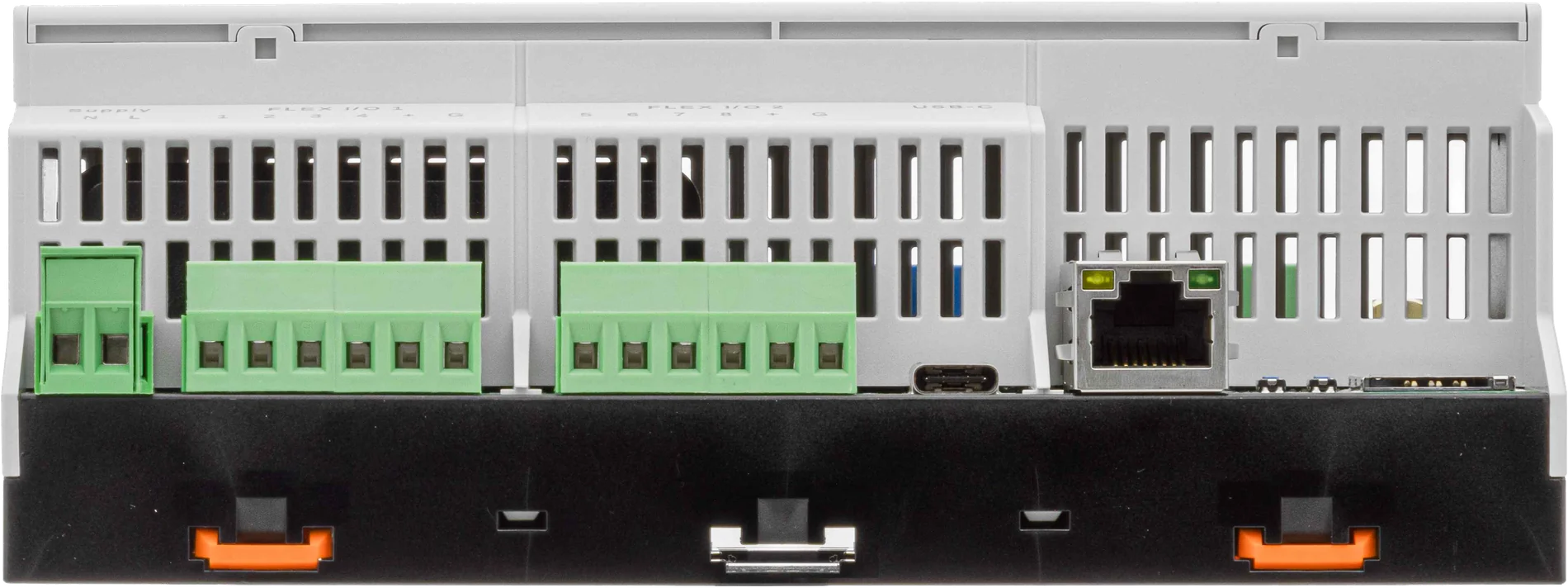
Lower terminal row of the EMU M-Center with supply, two Flex I/O blocks, USB-C socket, Ethernet service port, recovery and reset buttons and SIM card slot
Bottom: supply and service. Supply N and L · Flex I/O 1 with terminals 1 to 4 and + and G · Flex I/O 2 with 5 to 8 · USB-C for recovery · Ethernet ETH0 as the service port, with the fixed address 169.254.254.1 printed beside it · recovery and reset buttons · SIM card slot for the LTE modem.
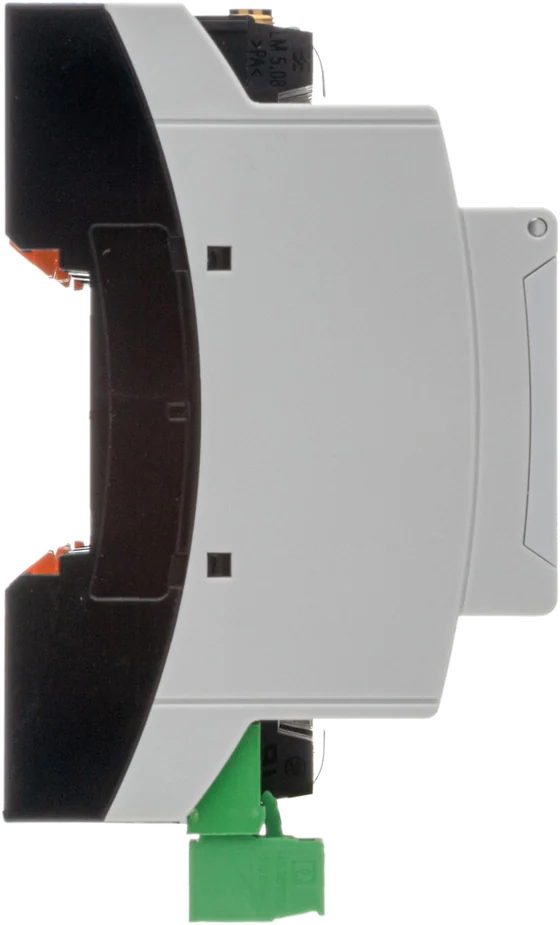
Side view of the EMU M-Center, height on the DIN rail
Side. The form factor fits under the usual cover in the distribution board, and the terminals stay freely accessible on both sides.
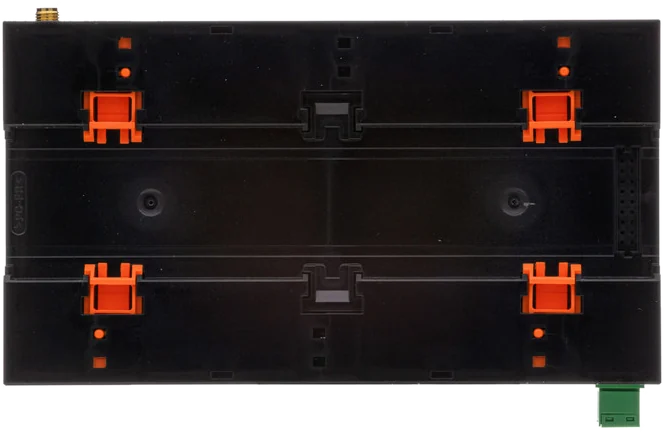
Rear of the EMU M-Center with four orange releases for DIN rail mounting
Rear. Four catches with orange releases. The device snaps on without tools and comes off again for replacement.

Operation

What does the M-Center web interface look like?


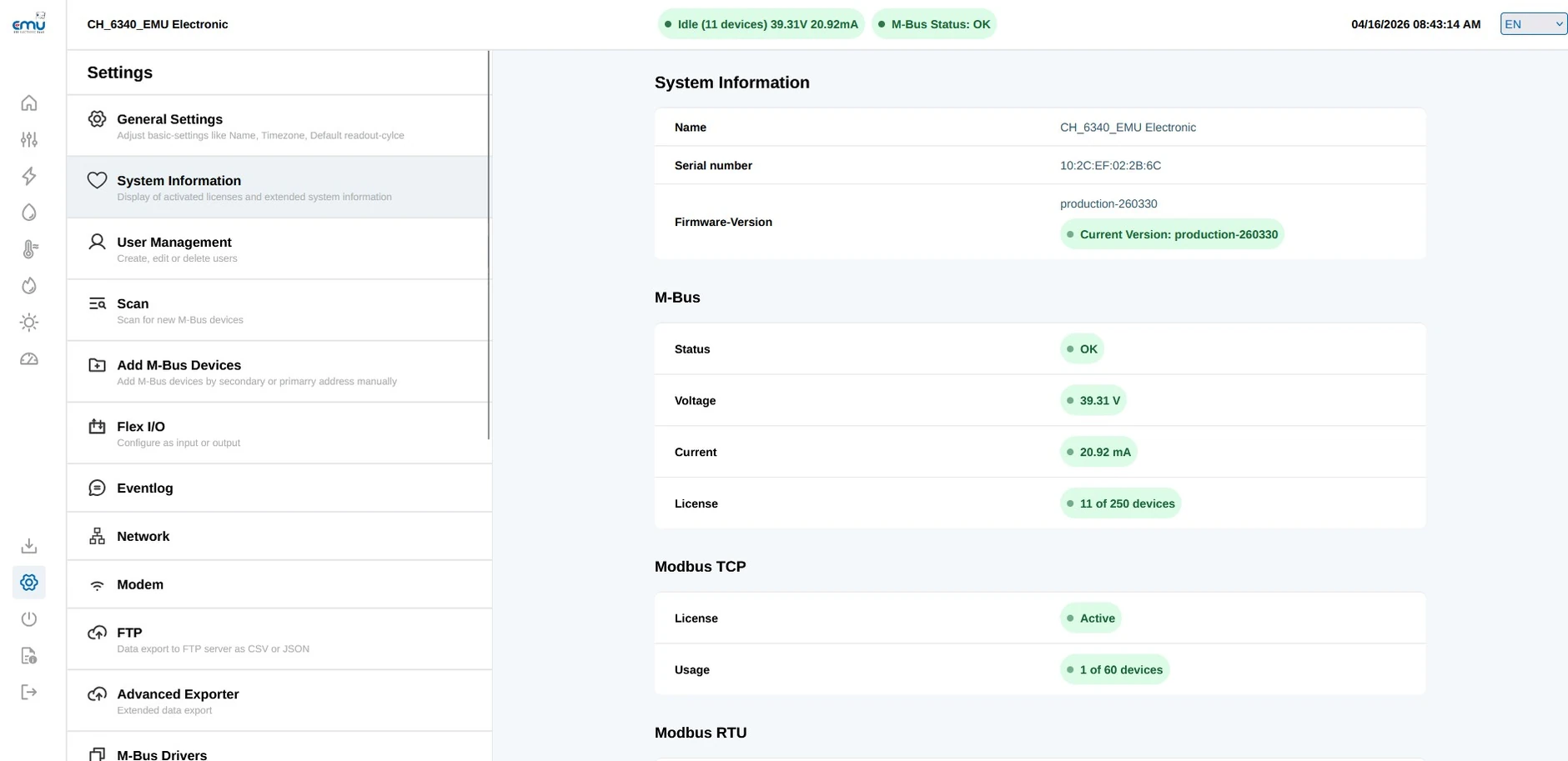
Everything is operated in the browser, locally at the service port or remotely. There is no software to install and no licence key on a laptop that belongs to nobody after three years.

M-Center web interface, system information page: name, serial number, firmware version, M-Bus status with 39.31 V voltage and 20.92 mA current, and the licences for M-Bus and Modbus TCP
System information. Firmware version, M-Bus status with measured bus voltage and bus current, and the licence status per protocol – in the example 11 of 250 M-Bus devices and 1 of 60 Modbus TCP devices. Before adding more meters you can see whether the bus and the licence still have headroom. Open the large view
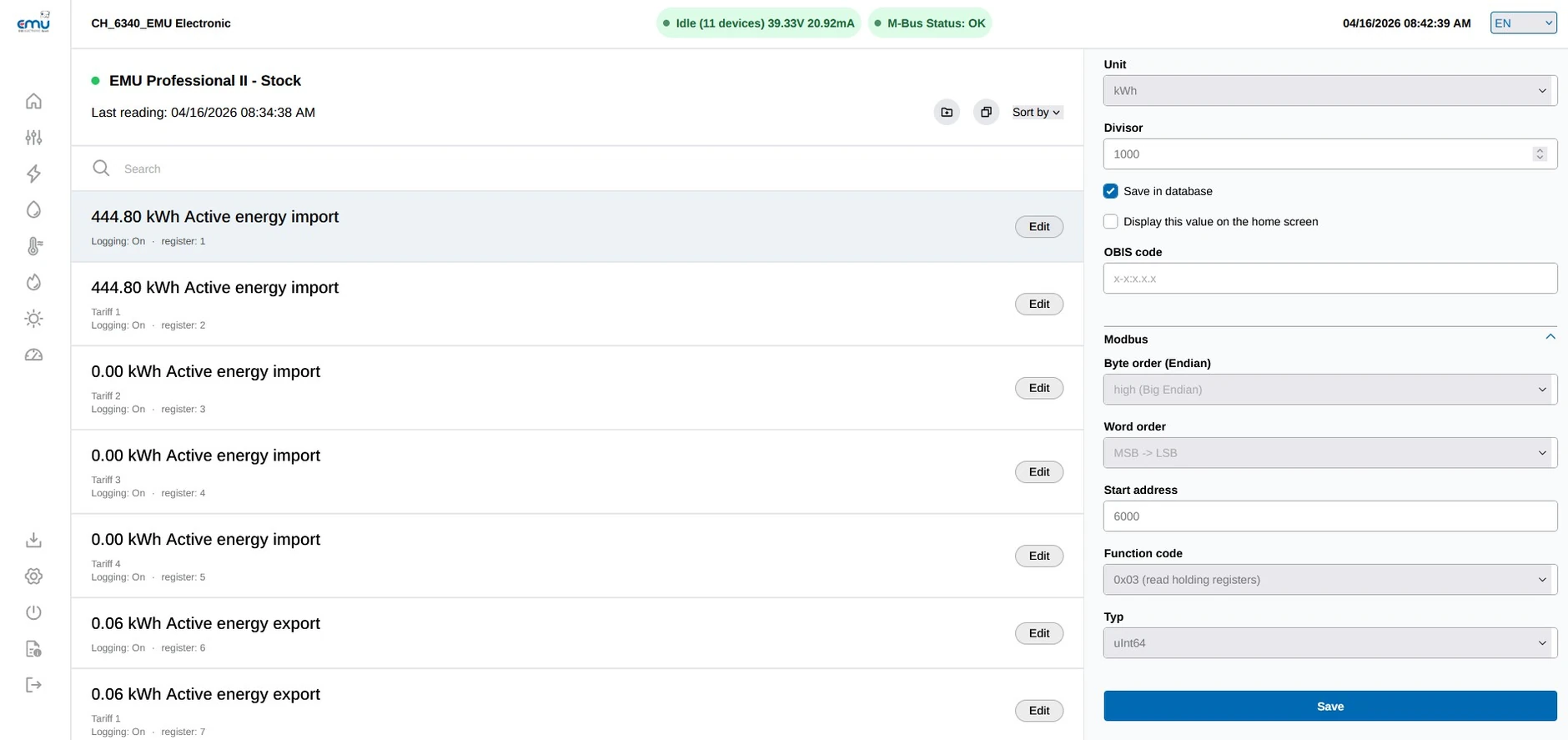
M-Center web interface: list of measured values of an EMU Professional II with register numbers, next to it the Modbus mapping with unit, divisor, OBIS code, byte and word order, start address, function code and data type
Measured values and register mapping. Every value of a meter can be set individually: unit, divisor, storage in the database, OBIS code and the complete Modbus mapping with byte and word order, start address, function code and data type. This gives the control room exactly the addresses to enter in the control system. Open the large view
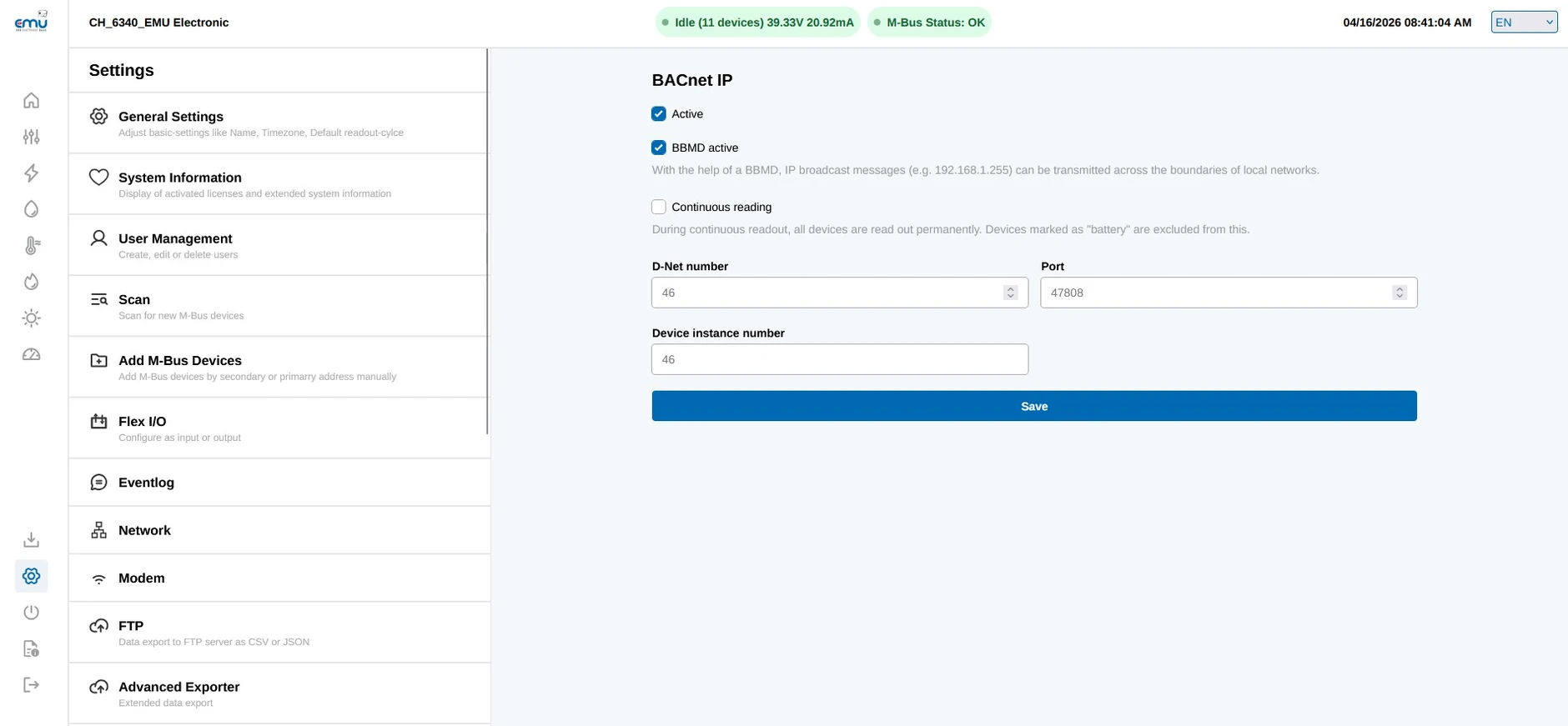
M-Center web interface, settings for BACnet IP with BBMD active, D-Net number, port 47808 and device instance number
BACnet IP. Activation, BBMD for broadcasts across subnet boundaries, D-Net number, port and device instance number – the four items the building management system asks for. Open the large view

Technical data

Technical data of the EMU M-Center


M-Busup to 250 devices, integrated high-performance level converter (max. 1600 mA)
Modbus RTU2× RS-485, up to 64 devices
Modbus TCPup to 60 devices
Network2× Ethernet
Mobile networkLTE with SIM card
FormatsCSV, JSON, Excel
ProtocolsMQTT, BACnet IP, Modbus TCP, OPC UA, API, email, (s)FTP
Power supply230 V AC / 24 V DC
Interfaces
M-Bus inputs2
M-Bus sniffer1
RS-485 inputs2
Flex I/O8 (including S0 pulse reading)
USB1× USB type C
Ethernet LAN1× 10/100BASE-TX, RJ45
Ethernet service port1× 10/100BASE-TX, RJ45
Mobile network1× LTE modem with SIM card
Inputs and outputs in detail
Supply 230 V ACmin. 1 A
Supply 24 V DCmin. 4 A
Data storage16 GB integrated
Operating temperature0 to 55 °C
Width162 mm
Weightapprox. 400 g
Installation35 mm DIN rail
HousingPolycarbonate, recyclable, non-flammable
Electrical, mechanical, environmental
MarkingCE
EMC / immunityEN 61000-6-2, EN 61000-6-3
M-BusEN 13757-2, EN 13757-3
BACnetB-ASC certified
Energy managementsuitable for ISO 50001
Encryption256 bit
Standards and certifications

Nerd mode

Licences and part numbers

The base unit comes with 20 M-Bus devices. Expansion stages and protocols are unlocked by licence – the maximum usable number of devices per interface depends on the licence purchased.

210.000.00M-Center for 20 M-Bus devices
210.020.01M-Bus licence 20 → 60 devices
210.020.02M-Bus licence 20 → 120 devices
210.020.03M-Bus licence 20 → 250 devices
210.200.00RS-485 licence 32 devices
210.200.01RS-485 licence 64 devices
210.200.03Modbus TCP licence 20 devices
210.300.00BACnet IP licence
210.300.01OPC UA licence
210.300.03MQTT licence
210.300.04Modbus TCP licence (M-Bus to Modbus TCP)
210.300.06Advanced Exporter licence
250.000.00Joulio-Web SaaS, base
250.000.01Joulio-Web SaaS, EMU and Helvatron meters
250.001.00Joulio-Web SaaS, charts
Source: data sheet 2141 M-Center

Order numbers

What are the order numbers for the EMU M-Center?


The base unit reads 20 M-Bus devices. More devices and further protocols are enabled by licence – also later on, without changing the hardware.

210.000.00M-Center for 20 M-Bus devices
210.020.01M-Bus licence 20 → 60 devices
210.020.02M-Bus licence 20 → 120 devices
210.020.03M-Bus licence 20 → 250 devices
210.200.00RS-485 licence 32 devices
210.200.01RS-485 licence 64 devices
210.200.03Modbus TCP licence 20 devices
210.300.00BACnet IP licence
210.300.01OPC UA licence
210.300.03MQTT licence
210.300.04Modbus TCP licence (M-Bus to Modbus TCP)
210.300.06Advanced Exporter licence
250.000.00Joulio-Web SaaS, base
250.000.01Joulio-Web SaaS, EMU and Helvatron meters
250.001.00Joulio-Web SaaS, charts
Source: data sheet 2141 M-Center

Documents

Data sheet and manuals for the EMU M-Center


All M-Center documents in English. The data sheet is enough for planning; for commissioning we recommend the quickstart and the manual side by side.

PDF M-Center data sheet2141 · English · technical data and part numbers PDF M-Center quickstart2150 · English · first commissioning PDF M-Center manual2151 · English · configuration and protocols WEB Commissioning step by stepGuide with animations · English

Data flow

How does the M-Center transmit its data to Joulio-Web?


Registration runs through a certificate in the device, not through a password in a configuration file. The channel is encrypted, and it is always set up from the M-Center outwards. More about the software: Joulio-Web.

  1. The M-Center identifies itself with a certificate. There is no password that someone could pass on or forget.
  2. Only once the certificate has been accepted is the encrypted channel established – after that, measured values and status messages flow.
  3. The connection goes from the device outwards. No inbound rule and no port forwarding is needed in the firewall.
  4. If the connection fails, the M-Center buffers locally and sends the missing values as soon as the channel is back.

The EMU M-Center registers with a certificate and transmits the measured values to Joulio-Web over an encrypted channel. The connection is always set up by the device.

Frequently asked questions

Frequently asked questions about the EMU M-Center


Commissioning, bus load, cable lengths, connection to control systems and use in tenant electricity, ZEV and LEG installations: the answers are based on the M-Center manual and on current Swiss legislation.

Fundamentals Commissioning M-Bus Modbus RTU and RS-485 Connection to control systems Flex I/O and pulse inputs Operation, updates and security Tenant electricity, ZEV and LEG

Fundamentals

What is the EMU M-Center?

The M-Center is a data logger and protocol gateway for the 35 mm DIN rail. It reads meters over M-Bus, Modbus RTU and Modbus TCP, stores the values locally and passes them on to control systems, billing software or the cloud.

Which meters can the M-Center read?

Meters with M-Bus to EN 13757, Modbus RTU over the two RS-485 interfaces, and devices with Modbus TCP on the network. Drivers are stored for common third-party makes, so that after the scan the devices deliver values with no manual mapping.

What supply does the device need?

230 volts AC with at least 1 ampere, or 24 volts DC with at least 4 amperes. The higher current draw at 24 volts comes from the M-Bus supply being drawn from the same source.

What does the number in the type designation mean?

It states how many meters the licence unlocks. An M-Center 20 reads 20 devices. Meters connected beyond that are not read, but still load the M-Bus with their current. That has to be taken into account in the bus load calculation.

How big is the M-Center and where may it be installed?

It is 162 millimetres wide and weighs around 400 grams. The permissible temperature range is 0 to 55 degrees Celsius; it is installed in the distribution board on the DIN rail.

Where is the M-Center manufactured?

In Switzerland. Development, PCB assembly, final assembly and testing all take place here, and technical support comes from Baar in the canton of Zug.

Commissioning

Do I need software for commissioning?

No. Operation runs entirely through an HTML5 web server in the browser, locally in the distribution board or remotely. No installation on the laptop is needed.

How do I reach the web interface?

The LAN port obtains its address by DHCP and can be reached through the host name mcenter-<MAC>.local. There is also a service port with the fixed address 169.254.254.1, through which the device stays reachable even without a DHCP server.

What are the factory settings for login?

User name admin, password 123. This password has to be changed on first access. In installations with remote access that is the single most important measure against unauthorised access.

How does the M-Center find the connected meters?

By an automatic scan for primary and secondary addresses. 2400 baud is recommended for the scan, because practically all M-Bus devices handle that rate and it offers the greatest range.

How long does the M-Center wait for a meter to answer?

The read timeout on the M-Bus is 3000 milliseconds. If a device does not answer within that time, it is marked as unreachable and the cycle carries on.

Which user roles are available?

Admin, operator and user. This separates who may configure, who may operate and who may only view data – useful where an operator and a service provider share the same installation.

M-Bus

How many M-Bus devices can the M-Center supply?

Up to 250 M-Bus slaves through the integrated level converter. The supply is decisive: at 230 volts AC the master delivers 450 milliamperes continuously and 600 milliamperes at peak, at 24 volts DC up to 1.6 amperes. A standard slave draws around 1.5 milliamperes.

How do I calculate the bus load?

Number of devices times unit load. A device with one unit load draws 1.5 milliamperes; some meters take two or more loads. The total has to stay below the master’s continuous rating, with a reserve for the switch-on moment.

How long may the M-Bus cable be?

Up to 5000 metres at 100 nanofarads per kilometre and a maximum loop resistance of 90 ohms. J-Y(ST)Y 2×2×0.8 millimetres is recommended, screened where possible. The connections are polarity-independent.

What range will I achieve in practice?

With a 2×0.8 millimetre cross-section and 2400 baud, around 1 to 1.5 kilometres is realistic. The actual range depends on baud rate, cable capacitance and the number of devices.

Which topologies are permitted?

Star, tree and line, including mixed. A ring topology is not permitted, because the return path short-circuits the bus and no longer allows unambiguous signal propagation.

What should I do if a meter is missing after the scan?

First check the bus load, then the device’s baud rate and the secondary address. The most common causes are an overloaded supply, a device with a differing baud rate, and duplicated primary addresses.

Modbus RTU and RS-485

How many Modbus RTU devices can I connect?

The M-Center has two RS-485 segments with up to 32 devices each. Splitting across two segments helps to separate long cable runs and differing baud rates.

How long may an RS-485 segment be?

1200 metres total length at most, with the main segment not exceeding 700 metres. Stubs should be kept short, because they cause reflections.

Where does the termination resistor belong?

A 120 ohm termination resistor goes at the far end of the segment. At the M-Center itself the termination is already present internally and must not be added again.

Can I run M-Bus and Modbus at the same time?

Yes. The M-Bus and the two RS-485 segments work in parallel. Mixed installations with M-Bus heat meters and Modbus electricity meters are the normal case.

Connection to control systems

Which protocols does the M-Center support on the output side?

MQTT with configurable topics and QoS as well as TLS, BACnet IP with BBMD function, OPC UA, Modbus TCP, an API, (s)FTP and email. CSV, JSON and Excel are available as data formats. MQTT, BACnet IP, OPC UA and the Modbus TCP conversion require a licence.

How do I connect the M-Center to a control system by Modbus TCP?

The M-Center maps the meter values it has read onto registers of its own. The register list can be viewed and exported in the web interface. A typical entry is register 6004, function code 0x03, data type uInt64, unit Wh, OBIS code 1-0:1.8.1.

How does the BACnet IP connection work?

Every object handed over receives an instance number through which the control system addresses it. If the control station is in a different subnet, the BBMD function takes over the forwarding of broadcast messages.

Which MQTT versions does the M-Center support?

MQTT 3.1, 3.1.1 and 5. Topic structure and QoS are freely configurable, and the connection to the broker can be encrypted with TLS.

At what interval does the M-Center read the meters?

The read cycle can be set from 15 minutes to 672 hours. Short cycles run on a fixed grid at the full quarter-hour, i.e. at :00, :15, :30 and :45, which keeps the values of different devices comparable in time.

What are the export files called?

Following the pattern <device ID>-<secondary address>-<yyyyMMddhhmmss> with the extension of the chosen format, that is csv, json or xlsx. That simplifies automatic further processing in the target system.

Are there limits on the free export?

The free exporter is limited to 3 devices with 10 values each. Larger installations need the corresponding licence.

Which functions require a licence?

MQTT, BACnet IP, OPC UA and the Modbus TCP conversion, as well as the number of devices that can be read. Which licences an installation needs follows from the meter list and the target system.

Flex I/O and pulse inputs

What are the Flex I/O inputs?

Eight inputs and outputs that are configured in pairs. They need a supply of their own of at most 36 volts DC and record, for instance, pulse outputs from meters with no bus interface.

Which S0 classes are supported?

Class A with 5 to 14 volts DC and class B with up to 25 volts DC. The class has to match the connected meter, otherwise pulses are not detected or are counted twice.

Operation, updates and security

What does the logger function do?

It stores load profiles in the M-Center. The function requires EMU Professional II meters, because only these hold the load profile in the device. If the connection fails, the M-Center retrieves around eight days of missing data per hour.

How do firmware updates work?

Through Device Management in Joulio-Web. For this the M-Center connects to the update servers menderv4.joulio.energy, mender.joulio.energy and mcenter.update.joulio.energy over ports 80, 443 and 9000. These connections have to be allowed in the firewall.

How do I back up the configuration?

Device Management in Joulio-Web can create backups of the configuration and restore them onto a replacement device. A backup is recommended before firmware updates and before larger changes.

What if the device no longer starts?

The manual describes a recovery over USB. Beforehand the LED codes on the front show which state the device is in and help to narrow things down.

Is there a mobile connection?

Yes, optionally through a built-in LTE modem with a SIM card. The connection state is shown in the interface. That is the usual solution for installations with no network connection on site.

How do I protect the M-Center on the network?

Change the default password, assign user roles, enable only the services needed, run MQTT with TLS, and do not expose the web interface unprotected to the internet. For remote access a VPN is the safe route.

Tenant electricity, ZEV and LEG

Is the M-Center suitable for tenant electricity and ZEV?

Yes. It reads the individual parties’ sub-meters, stores the values and hands them over for billing, for instance to Joulio-Web or a third-party system. The M-Center does not produce the bill itself.

What is a self-consumption association (ZEV)?

Several end consumers appear to the grid operator as a single end consumer. The legal basis is Articles 17 and 18 of the Energy Act in the version in force since 1 January 2025. The association organises the internal allocation itself.

What applies in a local electricity community (LEG)?

An LEG under Articles 17d and 17e of the Electricity Supply Act has existed since 1 January 2026. Every participant is equipped by the distribution grid operator with a smart metering system, which forms the basis for billing towards the grid. The M-Center supplies the values behind the connection point.

Do the sub-meters have to be verified?

Yes, if their values are used for billing. Electronic active energy meters must be re-verified every ten years under Article 6 EMmV. Responsibility for this lies with the operator of the installation, not with the distribution grid operator.

Can I integrate meters from other manufacturers?

Yes. Drivers are stored for widely used M-Bus devices, which deliver values directly after the scan. Devices with no driver can be mapped manually through the raw data of the M-Bus telegram or through Modbus registers.

Legal information from the Energy Act (EnG, SR 730.0) Art. 17 and 18, Electricity Supply Act (StromVG, SR 734.7) Art. 17d and 17e and the FDJP Ordinance on Measuring Instruments for Electrical Energy and Power (EMmV, SR 941.251) Art. 6 and 13. As at October 2026. The legal text in force at the time is definitive; this information does not replace legal advice.

Does the M-Center suit your installation?


Send us the meter list with manufacturer, protocol and quantity, together with your target system. We will check the bus load and tell you which licences you need.

Phone
+41 (0)41 545 03 00

Technical support
helpdesk@emuag.ch

Orders Switzerland
orders@emuag.ch